Digital Daily Planner 2027
Plan with intention, flow through your day
$3.75Regular price $15.0075%off
Black Friday Sale · Ends midnight PT
Not sure which layouts to pick? Choose what feels right today. After you buy, you can build a new version of your planner anytime, for free.
Secure checkout 14-day money-back guarantee
The 2026 planner is included, so you don’t have to wait for January.
Your year, months, weeks and days connected in one clutter-free digital planner for Goodnotes, Notability and other notes apps.
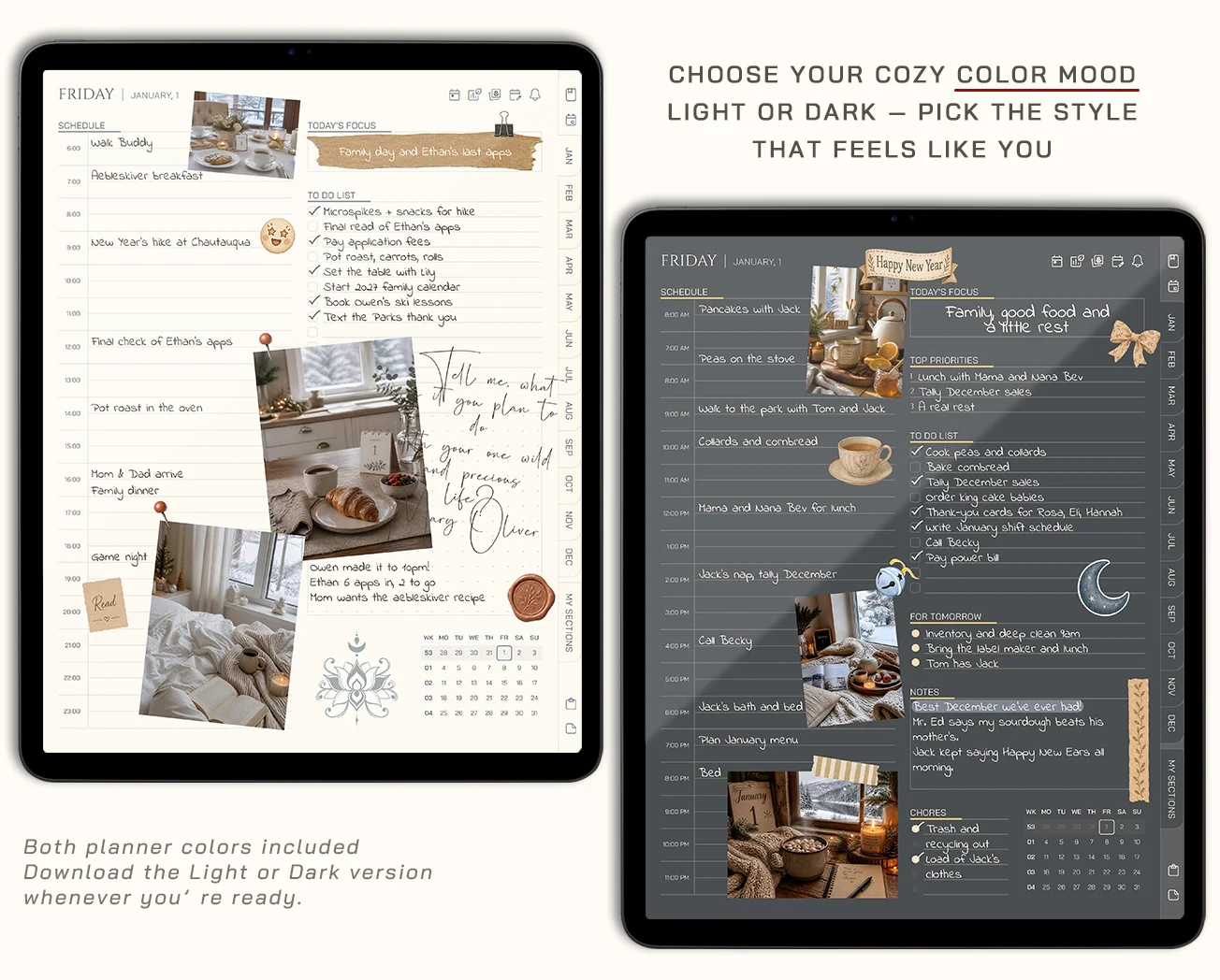
Light and Dark included · tap to preview
- Layouts that fit the way your day really goes
- One tap from your year to today
- Build it your way, rebuild it anytime
Works with your notes app
- Goodnotes
- Notability
- Noteshelf
- Penly
- Samsung Notes
- Xodo
For iPad and Android tablets, best with a stylus · free apps work too
- 5weekly layouts
- 4daily layouts
- 200+stickers
- 20covers
- 14 daysmoney-back guarantee
Made for real days
Know exactly where to begin each morning
Imagine opening your planner in the morning and knowing exactly where to begin. Your plans have a place, your priorities feel clear, and the day ahead feels a little lighter.
Yearly intentions, monthly plans, weekly rhythms and daily focus come together in one calm space, without the extra tabs and templates you’ll never use. You don’t need to change your whole life overnight. Just give tomorrow a thoughtful place to begin.
Who it’s for
- Creatives who want structure without losing their sense of flow
- Professionals carrying full schedules and meaningful ambitions
- Students who want to feel prepared, focused and less overwhelmed
- Anyone ready to bring a little more calm into everyday planning
Make it yours
Build a planner that fits your days
Pick the pages that fit your days and see a sample of each one.
Not sure? Start from an idea:
No pressure to choose the perfect setup now. You can create as many versions as you like after you buy it.
A little space to see the bigger picture. Keep track of important dates, upcoming events and plans throughout the year.
Pick your favorite weekly layout, and we'll keep it consistent throughout your planner.
Find your ideal way to plan each day. Your chosen layout will be used throughout the planner.
Everyone plans their day differently. Pick the schedule format that feels most natural to you.
Choose which calendar and reminder links to include in your planner. They'll open your chosen app with a new event or reminder ready to create.
What’s inside
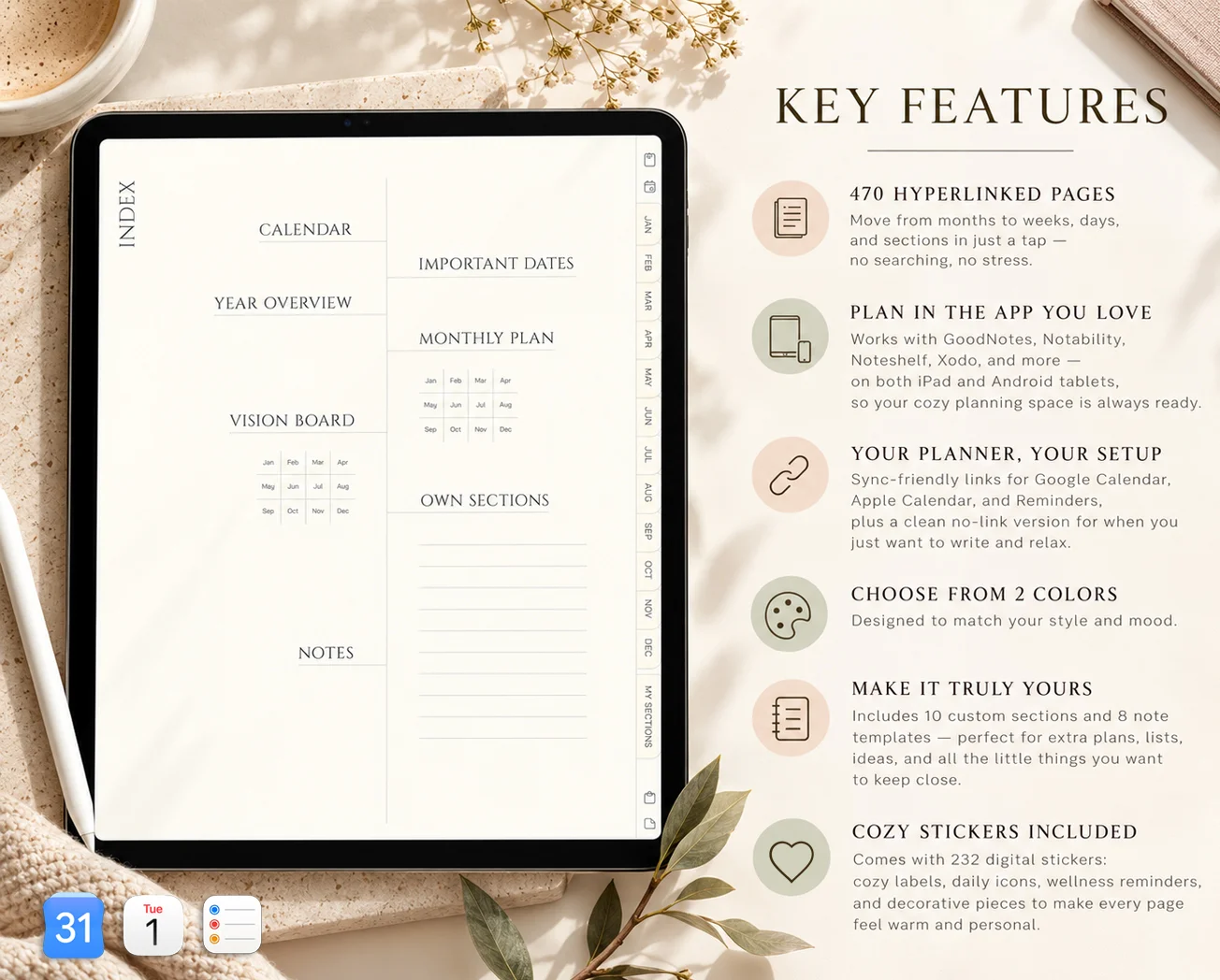
Yearly, monthly, weekly and daily pages that work as one
Yearly planner
The whole year on one calendar, your important dates for birthdays, deadlines and events, and a year overview in the style you like: a quarter planner or year highlights.
Monthly planner
A monthly calendar with key dates and notes, linked to each of its weeks and days, and a vision board to keep the month’s big picture in sight.
Weekly planner
Five ways to see your week, from a roomy vertical week to one with habits and chores. Pick the rhythm that fits yours.
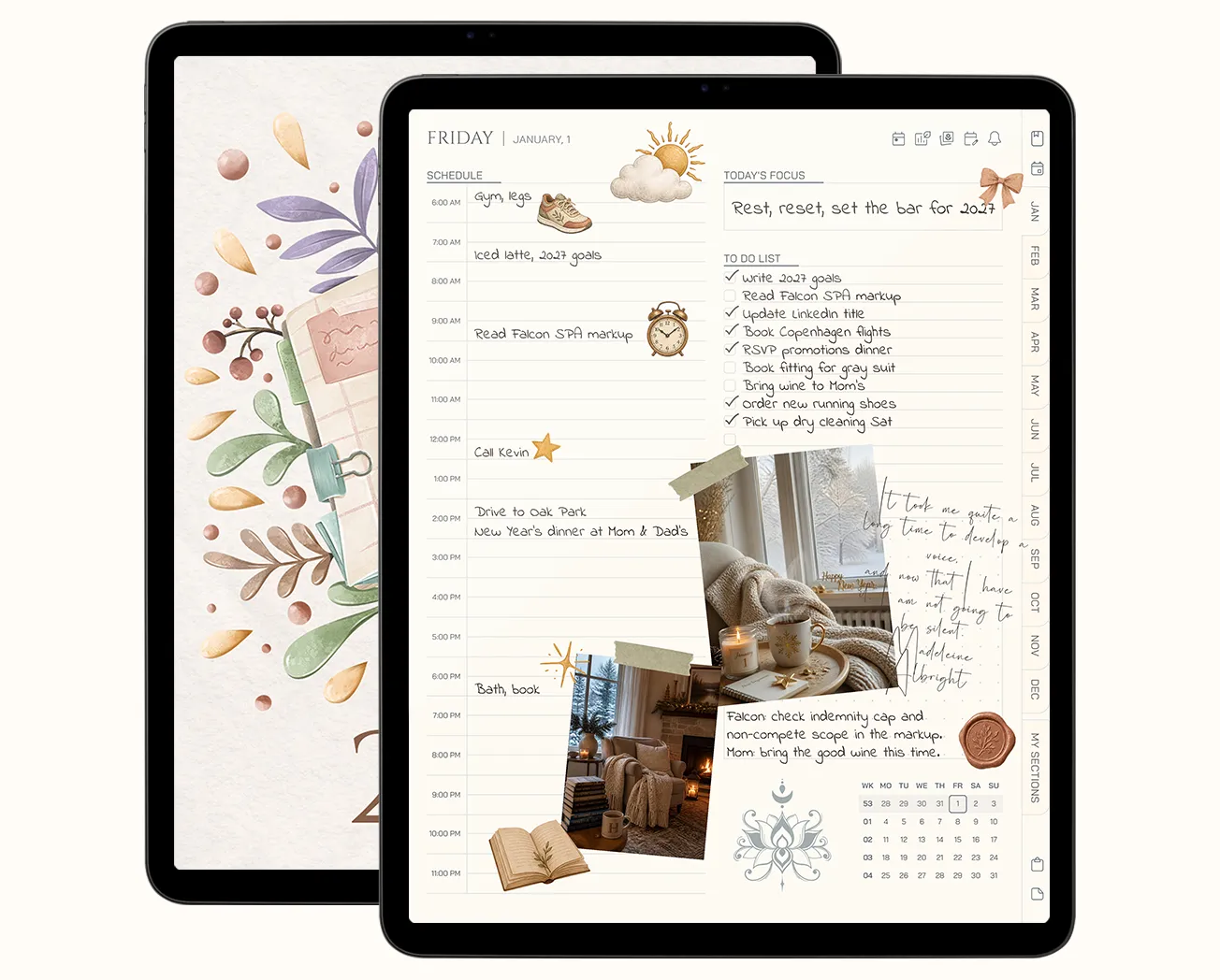
Daily planner
Four daily layouts for focus, schedules and to-dos. Plan by the hour (AM/PM or 24-hour) or in calm morning, afternoon and evening blocks.
Layouts that fit your day
Choose the weekly and daily pages that match your rhythm, and the schedule that matches your clock.
A little room of your own
- My Sections: 10 sections of your own for notes, journals, projects and more.
- Notes: 8 page styles for ideas, lists and the things a day page can’t hold.
- Covers, icons & stickers: 20 covers, 8 Home Screen icons and 200+ stickers to make it yours.
Your 2026 Daily Planner is included too, so you can start today.
Weekly layouts5 layouts
Vertical week, Weekly overview, To-do & inspiration, Habits & routines, Creative planning
Daily layouts4 layouts
Plan it all, Simple & focused, Daily balance, Write & sketch
Schedule styles3 styles
By the hour, AM/PM, By the hour, 24-hour, Morning, afternoon and evening
Small details that make it easier
Hyperlinked from top to bottom
Move from your yearly overview to any month, week or day with a tap, and back again without losing your place.
Google Calendar and Apple Calendar links
When a plan belongs on your calendar, add it to Google or Apple Calendar or Reminders. Nothing syncs on its own, so you always decide what becomes part of your schedule.
Monday or Sunday start
Your weeks begin the way you’re used to, and the week numbers match the calendar you already live by.
A step-by-step guide
An illustrated guide makes your first steps easy, and if you ever get stuck, we’re always happy to help.
Works with Goodnotes, Notability and more
Use it in the notes app you already love, on iPad, Android tablets, Windows or Mac. No Goodnotes? No problem. Free apps work too.




- iPad
- Android tablets
- Windows
- Mac
What customers say
4.9 out of 686 reviews
“I really appreciate the simplicity of this calendar. It’s not loaded down with tons of sections that I won’t use. However it does have a great note section where you can make some categories of your own. The vision board is nice too. A pleasant surprise was the stickers - You get a full sticker book with tons of cute and functional stickers!”
- “Beautiful! Minimal and functional as I was looking for! I recommend it to everybody” — Daniela
- “Minimal and useful planner. Links work as they should. Plenty of space for writing in the planner. Love it use it daily for work.” — Crystal Alfaro
- “This planner is just perfect for the first timer like me. Well organized and easy to use.” — Catherine Chen
“I really appreciate the simplicity of this calendar. It’s not loaded down with tons of sections that I won’t use. However it does have a great note section where you can make some categories of your own. The vision board is nice too. A pleasant surprise was the stickers - You get a full sticker book with tons of cute and functional stickers!”
Kristin
“Beautiful! Minimal and functional as I was looking for! I recommend it to everybody”
Daniela
“Minimal and useful planner. Links work as they should. Plenty of space for writing in the planner. Love it use it daily for work.”
Crystal Alfaro
“This planner is just perfect for the first timer like me. Well organized and easy to use.”
Catherine Chen
“I rarely leave written reviews! This planner is the real deal. Like it is truly a “minimalist” planner. It doesn’t contain all of those overwhelming additional templates, tabs, sections that I will never use. I was worried about not liking the off white cream tones of the planner and reached out to the seller before purchasing and she responded quickly. Although the color of the pages couldn’t be changed to white which I’m used to, she did explain that it was easier on the eyes for some and she was CORRECT! Thank you so much for the great customer service and creating a true minimalist planner!”
Tabitha
“Very happy with this planner, has everything I need. Love the paper colour & the bonus stickers are such good quality & look great! Will be buying more from this shop”
Christine
“A lovely and simplistic planner. Couldn’t ask for more!”
Lisa Boland
“Love the simplicity of this planner and easy it is to navigate!”
Genesis Rosa
“Great digital planner for iPad. Looks very clean and aesthetic”
Alexis Peery
“Simple, well organized and with just the right content, without sections that I am not going to use! I love it!”
Kmii Gnoni
“Gorgeous! If fit my needs perfectly and is easy to use.”
Caitlin Blewden
“Very comprehensive, well laid out. I pulled it into adobe acrobat pro and made a few modifications. Easy to work with. Happy to have purchased this and support the huge amount of work that went into building it.”
Lindsay Bean-Larson
“I had a small issue with the downloading process but she was able to help me out! And was very quick to respond!”
Galierodz131
“Im not one to use planners, but seeing how complete this one is makes me want to start one :D”
Darling Wolff Vásquez
“Love it! Beautiful planner, instant download.”
Trina
“Perfect. Exactly what I was looking for”
Alyssa Meredith
“Works great, customer service was great 👍”
Hailey Britton
“I like that it doesn’t have a lot of stuff I don’t need. Took me a minute to figure out how to download but I like it.”
Kathryn
“great planner, simple and effective”
Gabrielle Maran
“Excellent product and effective after service”
Luigi Rinaldi
“Very good sober effective If only the same format existed in a weekly version (week on a double page with the same sections on the right)!”
Nathalie PERRICHOT
“Nice planner, loved the design just wish there were more cute cover options”
Mikayla
“Great product. Easy to use!”
Shelley Ball
“Great planner, thorough thank you”
Two Busy Mums
“very well made, very usable”
Peter
“Just what I needed!! Great planner”
Tesha
“Great planner, it works perfect”
Cindy Miller
“Loved it item was exactly as expected”
Theresa Joplin
“I like it. Would recommend”
Jamie D
“Perfect for what I need!”
Lexi Souther
“Lovely planner, thank you so much!”
Theresa
“Thank you so much. Working with it.”
Marisa Williams
“Awesome... fun, easy”
Lorine Sam
“I like it, I will put it to use”
Micaela
Digital planner · 2027
Daily Planner 2027
A focused planner for your days, weeks and months, ready to use right away.
- Daily Planner 2027, built your way
- 2026 planner included
- 200+ PNG & Goodnotes stickers
- 20 covers & 8 shortcut icons
$3.75Regular price $15.0075% off
Black Friday Sale · Ends midnight PT
Secure checkout 14-day money-back guarantee Rebuild your planner anytime after purchase
Still deciding?
Want more than your schedule?
All-in-One Planner 2027
Your days, routines, goals, money and notes in one place, so you never have to switch between planners.
- All-in-One Planner 2027, built your way
- 2026 planner included
- 500+ PNG & Goodnotes stickers
$6.25$25.00
View plannerWant the whole year to feel this calm?
Mega Bundle 2027
Six cozy planners for your days, evenings, meals, workouts and books, in the same soft colors.
- 6 planners, 2026 editions included
- 700+ hand-drawn stickers
- 60+ section covers
$19.00$76.00
View bundleDigital planner FAQ
What is a digital planner?
It’s a planner you use in a notes app like Goodnotes, Notability or Xodo. You write on the pages, tap tabs and links to move around, and add stickers. It feels like a paper planner, with more freedom and less clutter.
Is this a physical product?
No, it’s a digital download. Nothing is shipped, and you can start right after checkout.
What do I need to use it?
A device that opens PDF files and a notes app, like Goodnotes, Notability, Noteshelf or Xodo. A stylus makes it feel just like writing on paper.
I’m new to digital planning. Is it easy to use?
Yes. Download the file, open it in your app and start planning. There’s no complicated setup, and the included guide shows you each step, with pictures.
Can I start before 2027?
Yes. Your 2026 Daily Planner is included, so you can start today and move into 2027 in January.
How is it different from the All-in-One Planner?
The Daily Planner keeps to your schedule, priorities and to-dos, with nothing extra. The All-in-One Planner adds pages for goals, money, meals, fitness and self-care, plus 61 templates.
Can I change my layouts after I buy?
Yes, for free. Each planner you download keeps the setup you chose, so for different layouts, a different color or a Sunday start, simply build a new version and download it again.
Can I use it on more than one device?
Yes, on your own devices. Plan on your iPad and check it on your phone when you’re out.
Can I add or reuse pages?
Yes. You can copy, move, add and delete pages in most notes apps, so your planner adjusts to your real life, not the other way around.
Can I print it?
It’s made for digital use, but you can print pages for your own personal use.
What happens after I buy?
You get instant access to your files, yours to keep, plus the option to build more versions of your planner. If anything doesn’t work, just write to us and we’ll help.
What if it’s not right for me?
We offer a 14-day money-back guarantee. Contact us within 14 days of purchase and we’ll refund you in full. See our Return Policy.
Can I share the files?
The files are for your personal use only, so please don’t share or resell them. If a friend loves the planner, they can get their own copy. It helps our small shop keep creating.
Still have a question? Write to us, we’re happy to help.
Daily Planner 2027
Ready to start 2027 with intention and ease?
Plan the year, shape each week and give every day the structure it needs. The 2026 planner is included, so the first clear next step can be today.
$3.75Regular price $15.00
Secure checkout Instant download 14-day money-back guarantee